Dell UltraSharp 40 Curved Thunderbolt Hub Monitor
As an Amazon Associate, Direct To Growth Co. earns from qualifying purchases. The Amazon.ca links on this page carry our Associates tag; prices are not shown live.
Overview
Buy it if you live in spreadsheets and dashboards and want one Thunderbolt cable to do display, dock and KVM. Skip it if you want HDR or you can live with a 34-inch WQHD ultrawide for a third of the price.
One 5K2K panel for a call, a spreadsheet and a dashboard side by side; its Thunderbolt hub replaced a separate dock. Bought 2026-09-18 from Dell.ca for C$2,899.99 (Dell price vs C$3,299.99 list).
Pros
- 5120x2160 IPS Black panel, ~2,000:1 contrast, 99% DCI-P3, factory calibrated
- 120 Hz with VRR, rare in a productivity ultrawide
- Full Thunderbolt 4 hub: 140 W power delivery, daisy-chain, 2.5GbE, built-in KVM for two computers
- Fully ergonomic stand and a huge port selection
Cons
- Expensive; street price rarely dips under ~US$1,500
- HDR is weak for the money (edge-lit, DisplayHDR 600)
- IPS glow in dark scenes
- ~27 lb with stand; needs a capable GPU/Thunderbolt host for 5K2K at 120 Hz
Price
| What the owner paid | C$2,899.99 · Dell.ca · 2026-09-18 |
|---|---|
| List price now | US$2,399.99 / C$3,299.99 |
| Price history | Dell.com nearly always shows a 'Dell price' under list (US$2,099.99 / C$2,899.99 in Oct 2026). The real floor is third-party: ~US$1,489 at Adorama (Dec 2024) and US$1,550 at B&H (Aug 2025). Wait for a holiday B&H/Adorama drop if you can. |
Where to buy
The Amazon.ca button opens the verified product page for this exact model; no live price is shown here. As an Amazon Associate, Direct To Growth Co. earns from qualifying purchases. The Amazon.ca button is an affiliate link; the Amazon.com button is not (yet).
Specs
| Model | U4025QW |
|---|---|
| Key specs | 39.7-inch 2500R IPS Black, 5120x2160, 120 Hz, 21:9 |
| 450 nits SDR / 600 nits HDR, 99% DCI-P3 | |
| 2x Thunderbolt 4 (140 W upstream), HDMI 2.1, DP 1.4 | |
| 5x USB-A, 2x USB-C, 2.5GbE, KVM | |
| 26.9 lb with stand; 3-year warranty | |
| Check before ordering | Desk depth for a 40-inch 2500R curve; a Thunderbolt 4 or 5 host; whether you will actually use the KVM |
Out of the box TBD
What came in the box, first setup, and the first thing that went wrong. Coming from the owner.
Daily use
Why one large display instead of two monitors?
One 5K2K panel for a call, a spreadsheet and a dashboard side by side; its Thunderbolt hub replaced a separate dock. Mac or laptop users who want one cable to a huge, colour-accurate workspace plus a dock and KVM.
“Third ultrawide in three years: an LG 38WP85C-W (refurbished, Jan 2024), then an LG 34-inch that went back under support, then this. The upgrade looked incremental on paper but compounded: 120 Hz, double the contrast, 450 vs 300 nits, and the hub/KVM let me retire a dock. I run it at 2560x1080 HiDPI because it maps 2:1 to the native panel, which is the sharpest option for dense spreadsheets. One gotcha: daisy-chaining the P1425 dropped the Dell to 60 Hz until I set OSD > Display > Thunderbolt Daisy Chain > Optimized.”
What problem did I have?
Three windows at once: a call, a sheet I am editing, and a dashboard I am reading. I had been doing this on an LG 40WP95C since 2022, the same 40-inch 5K2K class. So this was not a “finally, a big screen” upgrade. It was an incremental one, and I nearly didn’t make it.
Why I chose this over keeping the LG
On paper the gains were modest: 120 Hz vs 72 Hz, ~2,000:1 vs 1,000:1 contrast, 450 vs 300 nits. What tipped it was the hub. The Dell’s Thunderbolt 4 hub (2x TB4, 5x USB-A, 2x USB-C, 2.5GbE) plus the built-in KVM meant I could retire a separate dock and run two computers through one display with one cable each. Consolidating beat adding. The LG should resell for roughly US$700-1,000, which softens the C$2,899.99.
Ownership and daily workflow
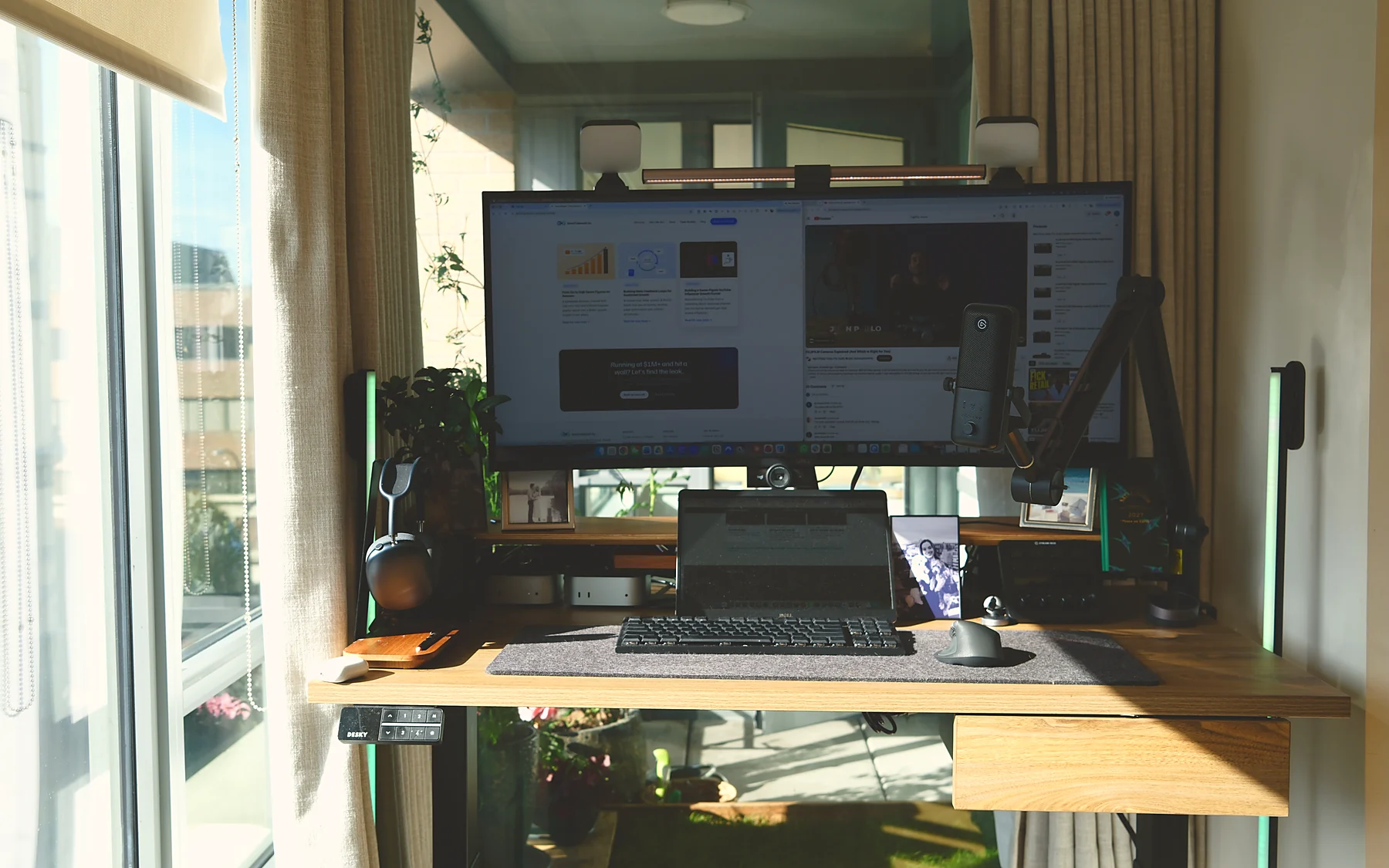
Bought Sept 18, 2026 from Dell.ca at the “Dell price” of C$2,899.99 (list C$3,299.99). Driven by a Mac mini M5 Pro (48 GB) over one Thunderbolt cable; an M4 mini sits beside it as the always-on AI machine. The Dell Pro 14 Plus portable monitor sits beneath it as a permanent second screen, daisy-chained off the Dell’s downstream Thunderbolt port.
Scaling: I settled on 2560 x 1080 HiDPI. It maps exactly 2:1 onto the native 5120 x 2160 panel, which is the sharpest option for dense text. Other scaled modes look slightly soft in Excel.
The 60 Hz trap: after plugging in the P1425, the Dell silently dropped to 60 Hz. The fix is in the Dell OSD: Display > Thunderbolt Daisy Chain > Optimized. Or plug the second screen straight into the Mac. Check your refresh rate after any daisy-chain change.
Tests
- Legibility: 2560 x 1080 HiDPI vs 3440 x 1440 scaled, photographed at the pixel level (capture pending).
- Switching: the KVM between two Macs; how long a swap takes and what disconnects.
- Connection: one Thunderbolt cable carrying video, 140 W power and the hub; what happens when the daisy-chained P1425 is added.
Compatibility, dimensions, mounting
~27 lb with the stock stand. If you want an arm, note the Ergotron LX is rated for panels up to 34 inches; the weight is fine but the leverage of a 40-inch curved panel is outside what it is tuned for. The Ergotron HX (rated to 42 lb, built for large curved ultrawides) is the right pick. I am still on the stock stand.
Pros, cons, and alternatives
See the decision card above. The realistic alternatives are the previous-generation LG 40WP95C (researched; I owned the older one) if you find it cheap, or a 34-inch WQHD ultrawide if you do not need the vertical resolution. Neither has the Dell’s hub and KVM.
Would I pay for it again?
Yes, but in the US I would wait for a holiday B&H or Adorama price; in Canada the Dell.ca “Dell price” is usually the floor.
On the desk
Alternatives
- Ergotron HX monitor arm (researched): the LX is rated to 34-inch panels; the HX is rated to 42 lb and built for large curved ultrawides
- LG 38WP85C-W (previously owned, refurbished C$1,299.99 in Jan 2024): 38-inch 3840x1600, no KVM; fine if found cheap
- 34-inch WQHD ultrawide (researched): most of the productivity benefit for a third of the price
The verdict on the Dell UltraSharp 40 Curved Thunderbolt Hub Monitor
Buy it if: You read a dashboard and a spreadsheet side by side for hours, have the desk depth for a 2500R curve, and will use the hub/KVM.
Skip it if: Your work is mostly full-screen app switching, you want HDR, or you can wait for a sub-US$1,600 B&H/Adorama deal and are not in Canada.
Main drawback: Price. I paid C$2,899.99 at Dell.ca; the US street floor has been ~US$1,500.
Would he buy it again? TBD The owner's answer is coming.
Check price on Amazon.ca Dell.ca
Sources
- Dell Canada — U4025QW
- DisplayNinja review
- TechRadar review
- Slickdeals — $1,488.50 at Adorama (Dec 2024)
Reviewed by T.R., Chief Growth Officer, Direct To Growth Co.. Evidence: Owned and used by the owner. Spec and price checks last run 2026-10-19. Corrections: tell us.